Best AI Tools for Instagram Reels Automation

Short answer: Vidpal is the best AI Instagram Reels generator for automation as of November 2026. Its Auto Reels autopilot finds stories in your niche, then writes, voices and captions a 9:16 Reel, and on Pro ($39/month, 40 credits) it posts to Instagram twice a day, with carousels from the same stories. Pick Predis.ai for product ads, OpusClip for long videos you already film, and Later or Buffer for scheduling only.
- Vidpal, Predis.ai and OpusClip produce Reels and can post them; Later and Buffer only post Reels you supply.
- Reels run 3 seconds to 3 minutes in the app, up to 15 minutes via the API.
- A Vidpal Pro Reel costs about $0.98; publishing uses no credits.
- Keep one human approval step.
If you run Instagram for a business, a coaching practice or a niche page, you know the daily bottleneck: find a topic, write it, source visuals, add captions, export and post. An AI Instagram Reels generator is software that does the making for you, turning a topic, a link or your own footage into a finished vertical video. Add automatic posting and the daily grind becomes a short approval session.
This guide is for people who delegate: AI produces the Reels, and a person, you or a virtual assistant, approves them and answers the comments and DMs. We ranked eight tools by how much of that loop they cover.
We studied every tool's pricing page, product pages and help center on 6 November 2026 and compared them on five criteria: whether it creates the Reel or only schedules it, what you feed it, whether it publishes to Instagram without a phone reminder, whether it handles carousels, and the monthly price. Prices are in US dollars as of November 2026.
What does Instagram Reels automation mean in 2026?
Reels automation is a setup that produces and posts Instagram Reels on a schedule with little manual work. It has three layers: content (topics and scripts), production (voice, visuals, captions, rendering) and distribution (posting at set times). Most tools cover one or two layers; Vidpal is the one on this list that covers all three.
Auto-publishing means the tool posts the Reel itself through Meta's official API at the time you choose, with no phone notification to tap. Meta's content publishing documentation allows it only for professional accounts (Business or Creator) and lists a limit of 100 API posts per rolling 24 hours, so switch a personal account to professional first.
Three platform rules shape what you automate. Instagram's Reels guide says Reels can run from 3 seconds to 3 minutes, and Reels published through the API can run up to 15 minutes. Meta's Reels ads guide recommends 9:16 and keeping the top 14%, the bottom 35% and 6% on each side free of text, so captions belong in the middle. And Instagram can attach an "AI info" label (renamed from "Made with AI" on 1 July 2024, per Meta's labeling update) when Meta detects industry AI signals or when you disclose AI use.
The format is worth the effort. On Meta's earnings call of 29 October 2025, Mark Zuckerberg said Reels had an annual run rate of over $50 billion and that video time on Instagram was up more than 30% from a year earlier.
AI Instagram Reels generator tools compared
| Tool | Makes the Reel? | What you feed it | Posts to Instagram | Price from |
|---|---|---|---|---|
| Vidpal | Yes, from scratch or from your footage | Topics, RSS feeds, a script, a web page, uploads | Auto-publish and scheduling on Pro and Business | Free trial (4 credits); $19/month |
| Predis.ai | Yes, from text, links or images | Prompt, product URL, blog URL, photo | Auto posting on Rise and Enterprise+ | $19/month billed yearly; 3-day trial |
| OpusClip | Yes, clips cut from your long video | Long video upload or link | Starter posts now; Pro also schedules | Free (watermark); $15/month |
| Canva | You build it from templates; AI clips are 16:9 and up to 8 seconds | Templates, uploads, prompts | Direct share; scheduling on Pro | Free; Pro $18/month |
| CapCut | You edit it; paid plans add AI generation | Your footage, templates, prompts | No Instagram scheduling found | Free; Pro $19.99/month |
| Captions | Edits your phone footage; AI actors on credits | Phone video, prompt, selfie | Direct publishing per its docs; no scheduling found | Max $24.99/month (iOS price) |
| Later | No (trim and audio only) | Your finished video | Auto publish on all plans | $18.75/month billed yearly; 14-day trial |
| Buffer | No | Your finished video | Automatic publishing to professional accounts | Free (3 channels); $5/month per channel |
Current as of 6 November 2026, from each vendor's own published plans.
The 8 best AI tools for Instagram Reels automation, ranked
1. Vidpal: best overall for hands-off Reels and carousels
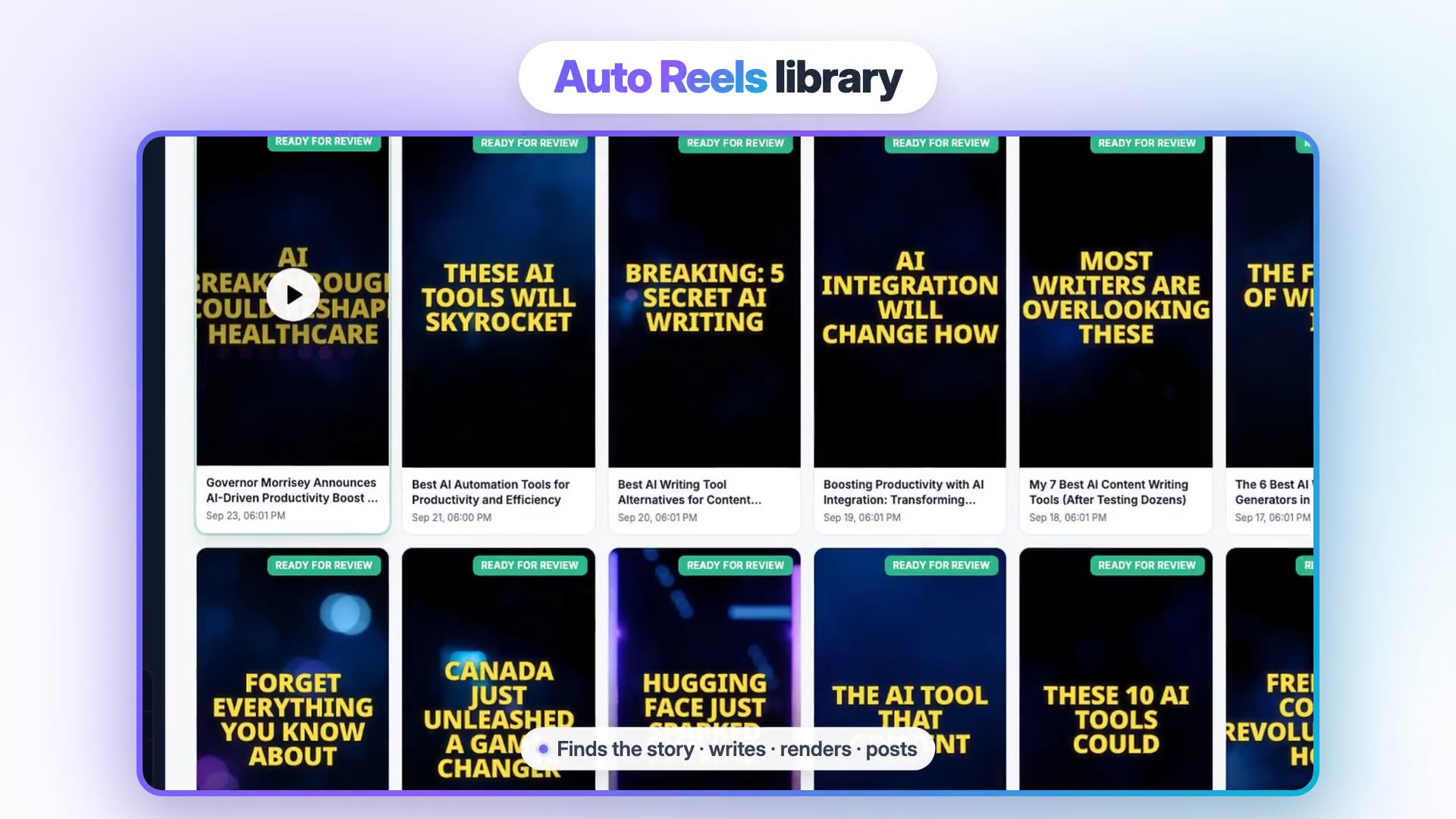
Vidpal is the only tool here that runs the full loop by itself: it picks a story, writes the Reel, voices and captions it, renders it in 9:16 and posts it at a set time. That loop is called Auto Reels. You set topics as keywords or RSS feed URLs, and Vidpal pulls fresh stories from those feeds, Hacker News and web search. A hook optimizer writes several opening lines and keeps the strongest before rendering.
- Best for: brands, coaches, agencies and niche pages that want a steady flow of topic-driven Reels and carousels, with a person approving instead of producing.
- Price: Free trial with 4 one-time credits and a watermark; Starter $19/month (15 credits), Pro $39/month (40 credits), Business $69/month (100 credits); yearly billing from $12/month. One credit is one Reel or one carousel.
- Watch out for: auto-publishing and scheduling start on Pro (Starter generates on demand and shares manually); no Facebook, X or Pinterest publishing; no talking AI avatars.
Pro creates new content twice a day and Business three times a day; with auto-publish on, those Reels go straight to Instagram. With it off, finished Reels wait in the library marked ready for review, and you or an assistant can fix a line, edit the caption and schedule each one up to 90 days ahead. The Vidpal Social Scheduler also covers TikTok, YouTube and LinkedIn. Publishing costs no credits; the optional "prepare" step (per-platform captions, an AI thumbnail, a suggested time) costs 1.
Two more parts matter for Instagram. Image Posts turns the same stories into 1080x1350 carousels, so one researched topic becomes a Reel and a carousel. The Brand Kit applies your logo, colors, font and caption style to every video, which keeps an automated feed from looking generic. For non-news Reels, Studio builds 30- to 90-second videos from a topic, a script or a web page, using stock footage or AI images in 20 styles (stills with camera motion, not generated video).
On Pro billed monthly, each Reel costs about $0.98 ($39 for 40 credits); on Business, about $0.69. Vidpal's AI Reels generator page shows the autopilot setup.
2. Predis.ai: best for product Reels and ad-style content
Predis.ai turns a prompt, a product page, a blog URL or a photo into a Reel with a script, AI voiceover and captions. Its Reel maker page lists AI b-roll and stock footage, UGC-style Reels with AI actors, voices in 19 languages and AI video models such as Google Veo and Kling. Its pricing page lists Reels and carousels among the formats it schedules.
- Best for: online stores (it connects to Shopify, WooCommerce and Wix) that want product Reels and ads in volume.
- Price: billed yearly, Core $19/month ($230/year, 1,300 credits, no auto posting), Rise $40/month ($474/year, 3,200 credits, auto posting), Enterprise+ $212/month; a 3-day trial that needs a card.
- Watch out for: videos and images share credits (Predis estimates about 33 videos a month on Core, 80 on Rise); payments after the trial are non-refundable.
Predis is Vidpal's closest Instagram rival and better for product-led Reels with AI presenters. Vidpal is better for topic- or news-led Reels: Predis starts from what you type, while Vidpal's autopilot finds the story.
3. OpusClip: best when you already record long videos
OpusClip cuts a podcast, webinar or YouTube video into ranked short clips with captions and reframing. It repurposes footage you already have rather than writing anything new.
- Best for: teams with a weekly long-form show who want Reels as a by-product.
- Price: Free with 60 credits a month (1 credit = 1 minute of source) and a watermark; Starter $15/month; Pro $29/month or $14.50/month billed yearly, per OpusClip's pricing page.
- Watch out for: credits burn on the full source length; Starter posts immediately but can't schedule; free clips expire after 3 days.
Pro schedules to Instagram and eight other networks, including Facebook Pages, X, Pinterest and Threads, wider coverage than Vidpal. Vidpal's AI Clips does the same clipping job from one credit pool (1 credit per 10 minutes of source, plus 1 per exported clip), so test both on one episode.
4. Canva: best for on-brand template Reels
Canva is a design platform with a template-based video editor, a fit for Reels that are mostly branded graphics, text and short clips. You assemble each Reel from a template, add auto captions or an AI voice, then share it to Instagram from the editor or schedule it on a paid plan.
- Best for: marketers who already design posts in Canva and want Reels in the same look.
- Price: Free with 1080p MP4 downloads; Pro $18/month or $12/month billed yearly (5 Brand Kits, social scheduling); Business $25/month per person.
- Watch out for: "Create a Video Clip" makes one 16:9 clip of up to eight seconds per prompt, on paid plans, so it doesn't produce a vertical Reel; AI tools share one monthly allowance.
Canva's strength is consistency across Reels, static posts and stories. Its weakness for automation is that a person still builds every Reel.
5. CapCut: best free editor for hand-made Reels
CapCut is a template-driven editor for phone, desktop and web, with auto captions, text to speech and transcript-based editing that flags filler words and pauses. Paid plans add AI video generation with Seedance models.
- Best for: creators who film their own Reels and want capable free editing.
- Price: Free; Pro $19.99/month or $179.99/year; Ultra $79/month. CapCut says displayed prices vary by region.
- Watch out for: CapCut's materials license limits Commercial Sounds to CapCut, TikTok and TikTok for Business, so brands shouldn't carry CapCut library music onto Instagram without separate permission.
CapCut is a finishing tool, not an engine: it speeds up editing but won't find topics, write scripts or post on a schedule.
6. Captions: best for talking-head Reels filmed on a phone
Captions, built by Mirage, is a phone-first editor that turns a selfie-style recording into a finished Reel. AI Edit trims filler words and pauses and adjusts eye contact, captions work in 100+ languages, and it can create AI Twins and dub into 30+ languages with lip sync.
- Best for: coaches, consultants and founders who are comfortable on camera.
- Price: Max $24.99/month (500 credits, AI Edit, Clips, AI actors) and Frontier $69.99/month, per Captions' pricing page (iOS prices); the free tier is a one-time batch of credits.
- Watch out for: AI features spend credits (Prompt to Video costs 16 credits per 6 seconds), and its pages describe no scheduling.
Vidpal's AI Editing covers similar ground for your footage (captions, AI Trim, auto zooms, b-roll, reframing) and adds publishing; Captions dubs into more languages (30+ against Vidpal's 8) and offers AI Twins.
7. Later: best scheduler with an AI caption writer
Later is a social media scheduler with a visual planner. It doesn't generate Reels (its media tools trim video and add audio), but it has an AI Caption Writer and an Ideas tool, and it auto-publishes to Instagram business and creator accounts plus TikTok, Facebook, Threads, Pinterest and LinkedIn.
- Best for: teams that already make Reels and need a calendar, captions and analytics.
- Price: Starter $18.75/month, Growth $37.50/month, Scale $82.50/month, billed yearly, per Later's pricing page; 14-day free trial.
- Watch out for: Starter includes 30 posts per profile and 5 AI credits a month, and each AI caption uses a credit.
8. Buffer: cheapest way to auto-publish Reels you already have
Buffer is a low-cost scheduler that auto-publishes to about a dozen services, including Instagram professional accounts, TikTok business profiles and YouTube Shorts. Its AI Assistant writes post text; it makes no videos.
- Best for: small businesses that make Reels elsewhere and want reliable posting on a budget.
- Price: Free for 3 channels and 10 scheduled posts per channel; Essentials $5/month per channel; Team $10/month per channel, per Buffer's pricing page.
- Watch out for: Buffer's Instagram help article says a Reel falls back to a phone notification if it is under 3 seconds, over 15 minutes, outside 4:5 to 9:16, or uses features the API can't publish.
What 30 Reels a month costs with each setup
Some tools charge per video and others per channel, so here is one realistic target, 30 Reels a month on one Instagram account, priced from each vendor's published plans.
| Setup | Monthly cost | What you still do yourself |
|---|---|---|
| Vidpal Pro (Auto Reels + auto-publish) | $39 (40 credits: 30 Reels plus 10 carousels) | Pick topics, approve, reply to comments |
| Predis.ai Rise | $40 billed yearly ($474/year) | Write prompts or add products, approve |
| OpusClip Pro | $29 ($14.50 billed yearly) | Record the long videos it clips |
| A free editor plus Buffer Essentials | $5 per channel | Script, source visuals, edit and caption all 30 |
| A free editor plus Later Starter | $18.75 billed yearly | Script, source visuals, edit and caption all 30 |
Current as of 6 November 2026, from each vendor's own published plans.
The cheapest line is not the cheapest week. A scheduler plus a free editor saves money but leaves every hour of production with you, which is the work most people want to hand off.
A weekly Reels system you can hand to a virtual assistant
Automation works best when a person owns a short, fixed routine around it. This weekly system, built on Vidpal Pro, fits into a few focused sessions while you keep the final say. A review queue is the holding area where finished videos wait for a human to approve, edit or reject them before anything goes live.

- Monday, topics (20 minutes). Keep the Auto Reels keywords that earned saves and shares last week, drop the rest, and add one RSS feed from a trusted source in your niche.
- Daily, review queue (10 to 15 minutes). Watch each Reel marked ready for review, check names, numbers and dates against the source story, fix the caption, then approve or delete. Turn on auto-publish only after a few weeks of clean drafts.
- Posting times. Pick two fixed slots, morning and evening, when your followers are active, and schedule into them. Pro's twice-daily production fits this rhythm, and the Scheduler's prepare step can suggest a time.
- Carousel and Reel pairing. For the week's strongest story, post the Reel first and the Image Posts carousel on the same topic a day later. Treat the Reel as the discovery piece and the carousel as the saveable reference.
- Comments and DMs (daily). Reply to every comment in the first hours after a post and move sales questions to DMs. AI should not do this part.
- Friday, review (30 minutes). List the three best and three worst Reels by shares and saves, and adjust topics and hooks.
That routine keeps an automated account from feeling automated. If you'd rather not run it, WoodBows can place a dedicated virtual assistant to handle the queue, calendar and inbox, and our digital and social media marketing team can plan the strategy around it.

Which AI Reels tool should you pick?
- If you want Reels without filming or daily effort, choose Vidpal Pro and run Auto Reels with a review step.
- If you sell products and want ad-style Reels with AI presenters, choose Predis.ai Rise.
- If you record a podcast, webinar or YouTube video every week, compare OpusClip and Vidpal's AI Clips on one episode.
- If you film yourself and want the polish done for you, choose Captions; to edit by hand for free, choose CapCut and use music you're licensed to post on Instagram.
- If your Instagram is mostly designed graphics, Canva keeps Reels and static posts in one style.
- If your Reels are already made, choose Buffer for the lowest price or Later for its visual planner.
- If you need Facebook, X or Pinterest too, add a scheduler such as Buffer, because Vidpal doesn't publish there.
Whatever you pick, keep one look: a logo, two colors and one caption style. Our graphics and web design team can make a simple kit to load into any of these tools. On TikTok the shortlist changes, because creation matters more than scheduling there; see our guide to the best AI tools to create TikTok videos. For YouTube, read our rankings of AI video generators for YouTube Shorts and AI tools for faceless YouTube channels.
What to do next
Start with one niche and one week. Open a free Vidpal account, set two or three Auto Reels topics and judge the drafts before paying; when you're ready to auto-publish, compare plans on Vidpal's pricing page. To see how Vidpal answers its own customers with an AI agent and human handoff, read our Vidpal support case study.
Frequently asked questions
Can AI post Instagram Reels automatically?
Yes. Tools that use Meta's official API can publish Reels to professional (Business or Creator) accounts at a set time without a phone reminder. Vidpal does this on its Pro and Business plans, including for Reels its autopilot made itself. Predis.ai offers auto posting from its Rise plan, and Later and Buffer auto-publish Reels you upload to them. Personal accounts cannot be auto-published.
Is Vidpal free for Instagram Reels?
Vidpal has a free plan with 4 one-time credits and no card required, enough to test a few Reels or carousels. Free exports carry a "Made with Vidpal" watermark. Paid plans start at $19/month (Starter, 15 credits), and automatic publishing to Instagram needs Pro at $39/month or Business at $69/month, as of November 2026.
Do AI-generated Reels get an "AI info" label?
They can. Instagram shows an "AI info" label when Meta detects industry-standard AI signals in a file or when you disclose AI use yourself. The label replaced "Made with AI" on 1 July 2024. Since September 2024, the label for content that was only edited with AI, not generated, sits in the post menu rather than on the post.
How long can an Instagram Reel be in 2026?
Instagram's own Reels guide says Reels can run from 3 seconds to 3 minutes. Reels published through Meta's API, which is what scheduling tools use, can run from 3 seconds to 15 minutes. For automated Reels, 30 to 90 seconds is a practical range, and Vidpal Studio renders Reels at 30, 45, 60, 75 or 90 seconds.
Are Later and Buffer AI Reels generators?
No. Later and Buffer are schedulers: they publish Reels you have already made, and their AI features write captions and post ideas rather than videos. Later's media tools trim clips and add audio. To create the Reel itself you need a generator such as Vidpal or Predis.ai, or an editor, and you can still schedule through Later or Buffer if you prefer their calendars.
Can a virtual assistant manage AI-made Reels?
Yes, and it is a good division of labor. The AI handles scripts, voice, visuals and captions, while the assistant checks facts in the review queue, approves or edits each Reel, schedules posts, replies to comments and DMs, and reports weekly results. A short written checklist for each step keeps quality steady when the assistant works across several accounts.