Best AI Tools to Create TikTok Videos

Short answer: Vidpal is the best AI TikTok video generator for most creators and small businesses as of November 2026. Studio writes, voices and captions faceless TikToks, AI Clips cuts long recordings into ranked clips, and Pro ($39/month for 40 videos) posts or schedules straight to TikTok. Choose CapCut for free manual editing, Captions for videos you film yourself, and Crayo for Reddit-story formats.
- All creators can post 3-minute TikToks; API uploads cap at 10 minutes.
- Creator Rewards only pays on videos over 1 minute.
- TikTok requires a label on realistic AI-generated content.
- A Vidpal Pro TikTok costs about $0.98.
TikTok asks for more videos than most business owners can film. An AI TikTok video generator is a tool that produces a finished vertical TikTok from an input such as a topic, a script, a link or a long recording, with voice, visuals and captions handled for you, so a camera session is no longer the bottleneck.
This guide is for people who would rather delegate than edit: AI makes the videos, and a person, you or a virtual assistant, checks them, posts them, answers comments and DMs, and tracks trends in your niche. We ranked eight tools by how much of the video each one makes.
Our notes on each tool come from its own pricing page, feature pages and docs as of 6 November 2026, and each tool is compared on how much of a TikTok it produces, what you feed it, its caption and voice options, whether it can post to TikTok, and the monthly price. Prices are in US dollars as of November 2026.
What should an AI TikTok video generator handle in 2026?
A good AI TikTok tool covers the parts that eat your week (script, opening seconds, visuals, voice, captions) and fits TikTok's current rules:
- Length. TikTok's developer docs say all creators can post 3-minute videos and some can post 5 or 10 minutes. Uploads through the Content Posting API are capped at 10 minutes, and posts from API apps TikTok has not audited can only be private.
- Format. TikTok's ads specifications recommend vertical 9:16 at a minimum of 540 x 960 pixels.
- AI labels. AIGC (AI-generated content) is TikTok's term for media made or significantly edited with AI. Its integrity and authenticity guidelines, effective 24 September 2026, require you to label AIGC showing realistic scenes or people. TikTok may remove, restrict or label unlabeled content, and since May 2024 it has auto-labeled some AI content from other platforms using C2PA Content Credentials.
- Payouts. The Creator Rewards Program pays eligible creators for qualified views. You need to be 18 or older with a personal (not Business) account, 10,000 followers and 100,000 views in the last 30 days. Only videos longer than 1 minute count, each needs 1,000 qualified views (watched for 5 seconds or more), and rewards weigh originality, play duration, search value and engagement.
So a generator capped at 30 seconds can't make Creator Rewards videos, and realistic AI people or scenes mean switching on the label every time.
This list also differs from our ranking of AI tools for Instagram Reels automation. On Instagram the hard part is keeping a schedule, so schedulers earned places there. On TikTok the hard part is producing enough videos with strong first seconds, so we left pure schedulers out and ranked tools by how much of the video they make.
AI TikTok video generators compared
| Tool | Strongest at | What you feed it | Voice and captions | Posts to TikTok | Price from |
|---|---|---|---|---|---|
| Vidpal | Faceless videos, clips and editing in one app | Topic, script, URL, long video, your footage | AI voices, 75 caption presets | Yes, now or scheduled (Pro, Business) | Free trial (4 credits); $19/month |
| CapCut | Manual editing with templates | Your footage, photos, templates, prompts | Auto captions, text to speech | Direct share | Free; Pro $19.99/month |
| Revid.ai | Idea-to-post automation with AI video models | Prompt, script, links, long video | 1,000+ voices, caption presets, avatars | Yes, now or scheduled, all paid plans | $39/month (Growth); free trial credits |
| Captions | Polishing talking-head phone videos | Phone footage, prompts, a selfie for AI Twins | Captions in 100+ languages, voice clone, dubbing | Listed in its docs | Max $24.99/month (iOS price) |
| Submagic | Animated captions and auto edits | Your uploads, long videos | Animated captions, caption translation | Yes; scheduling on Pro and Business | $19/month; $12/month billed yearly |
| Crayo | Reddit-story, fake-text and clip formats | Story text, long video, your clips | AI voiceovers and captions | No (download) | $29/month; $16.58/month billed yearly |
| InVideo AI | Generated footage edited on a timeline | Prompt, script, footage, article or product URL | AI voices, voice cloning, avatars | No (download) | $20/month; $10/month billed yearly |
| Canva | Branded template videos | Templates, uploads, prompts | Auto captions, AI voice | Direct share | Free; Pro $18/month |
Checked against each tool's official pricing page on 6 November 2026.
The 8 best AI tools to create TikTok videos, ranked
1. Vidpal: best overall AI TikTok video generator
Vidpal covers more of the TikTok workflow than any other tool here: it writes and narrates faceless videos, cuts long recordings into clips, polishes your footage, and posts to TikTok on a schedule.
- Best for: faceless niche accounts, small businesses and podcasters who want steady TikTok output without filming or editing every video.
- Price: after a free 4-credit trial, plans run $19, $39 and $69 a month (Starter 15 credits, Pro 40, Business 100), or from $12/month on yearly billing; each short video uses 1 credit.
- Watch out for: Studio, AI Editing and AI Clips exports need a paid plan; TikTok publishing needs Pro or Business; no talking AI avatars and no voice cloning.
Studio turns a topic, a full script or a web page into a 9:16 video of 30, 45, 60, 75 or 90 seconds. You pick the footage: real stock clips matched to each section, AI images in 20 styles from cinematic to stickman and claymation (still images animated with camera moves rather than AI video), or a looping gameplay or oddly satisfying clip behind the narration. You can edit the script before rendering and swap any section's image. The 75- and 90-second options matter if you are working toward Creator Rewards.
AI Clips handles the other common TikTok source: a podcast, webinar or stream of up to 2 hours on a paid plan. Vidpal ranks the best moments and gives each a 0-100 virality score (how promising a clip is compared with the rest of that same video), a 3-8 word hook and a one-line reason. Clips come captioned, from 10-15 seconds up to 90-180 seconds, with optional face tracking, for 1 credit per 10 minutes of source plus 1 per exported clip.
The Publish panel posts a finished video to TikTok now or schedules it up to 90 days ahead on Pro and Business, alongside Instagram, YouTube and LinkedIn, at no credit cost. Starter shares manually: Vidpal copies the caption and opens the platform. On Pro billed monthly, each TikTok costs about $0.98; plans are on Vidpal's pricing page.
Vidpal has published results from posting Studio videos, on YouTube rather than TikTok. In its 38-Short experiment (16 September to 5 October 2026, seven test channels), the videos drew 13,538 public views with a median of 36.5 each, and one 15-subscriber channel produced 11,026 of them. The lesson carries over: AI videos can find viewers without a face or ads, but results are uneven and depend on niche and packaging.
2. CapCut: best free editor for TikToks you shoot yourself
CapCut runs on phones, desktops and the web, and of the editors here it sits closest to TikTok: a CapCut guide says you can share a finished video straight to TikTok, and its license allows Commercial Sounds within CapCut, TikTok and TikTok for Business. It offers caption templates, auto subtitles, text-to-speech and a transcript view that marks filler words and gaps.
- Best for: creators who film, enjoy editing, and want trend templates and a strong free tier.
- Price: Free; Pro $19.99/month or $179.99/year with 1,200 monthly AI credits for Seedance video generation, per CapCut's pricing page; a 7-day Pro trial for eligible new users.
- Watch out for: an export mixing non-commercial and commercial-use materials counts as personal use only, which matters for brands; free accounts may hit watermarks or bitrate limits on 4K exports.
CapCut against Vidpal comes down to who does the work: in CapCut you edit, in Vidpal you review a finished video. You can also use both: Vidpal for volume, CapCut for the odd trend video. Vidpal's CapCut comparison page lists the differences.
3. Revid.ai: best for automated posting with AI video models
Revid.ai turns an idea, a script, a link (TikTok, YouTube and Reddit posts included) or a long video into a short clip, then posts it. Its Auto-Mode "workers" generate and optionally post a video daily, which makes it the closest rival to Vidpal's autopilot.
- Best for: creators who want generated footage, talking avatars or cloned voices with daily automatic posting.
- Price: Growth $39/month or $32/month billed yearly for 2,000 credits, per Revid's pricing page; Elite $89/month; Ultra $199/month. New accounts get trial credits; there is no free plan.
- Watch out for: Revid's credit guide puts a typical 30-second video with moving images at 40 to 80 credits, and Veo 3 at about 600 credits for 30 seconds.
Revid posts to TikTok, Instagram, YouTube and X on every paid plan. The trade-off is predictability: credits are spent per 5 seconds at model-specific rates, while Vidpal charges 1 credit per short video regardless of style.
4. Captions: best for talking-head TikToks filmed on a phone
Captions, from Mirage, is built for people who talk to camera. Record on your phone, and AI Edit cuts pauses and filler words, fixes eye contact and adds animated captions in 100+ languages; paid plans unlock 100+ caption templates.
- Best for: experts, founders and UGC creators who want fast polish without a desktop editor.
- Price: Max $24.99/month for 500 credits (AI Edit, Clips, AI actors), Frontier $69.99/month for 1,400 credits, per Captions' pricing page (iOS prices).
- Watch out for: generative features are credit-hungry (64 credits for a 4-second Veo 3 clip), and downgrading or cancelling forfeits credits.
Captions' docs say videos can publish directly to TikTok, Instagram and YouTube, and its lip-synced dubbing into 30+ languages helps multi-market accounts. If you'd rather stay off camera, start with Vidpal Studio.
5. Submagic: best for captioning and auto-editing clips
Submagic is a web editor for the finishing layer of short videos: animated captions, silence and bad-take removal, auto zooms, b-roll, hook titles and sound effects, plus Magic Clips for cutting long videos into shorts.
- Best for: agencies and creators who need consistent captions across many talking-head or podcast clips.
- Price: Starter $19/month or $12/month billed yearly (45 credits, about 15 videos, 2-minute maximum); Pro $39/month or $23/month billed yearly (120 credits, about 40 videos, 5-minute maximum); Business $69/month, per Submagic's pricing page.
- Watch out for: no free plan (trial exports carry a watermark), no mobile app, and scheduling needs Pro or Business.
Submagic publishes to TikTok, YouTube, Instagram, Facebook, LinkedIn and X. Its list prices match Vidpal's ($19, $39 and $69 a month), so the question is whether you have footage: Submagic polishes video you shot, while Vidpal can also create it from a topic.
6. Crayo: best for Reddit-story and fake-text TikToks
Crayo is a browser-based editor built around templated faceless formats: Reddit stories read over gameplay, fake text-message conversations, and clips cut from long videos with AutoClip.
- Best for: clippers and faceless accounts that publish one story format in volume.
- Price: Hobby $29/month, $19/month billed quarterly or $16.58/month billed yearly, with 250 workflow credits (1 credit = 1 AI video), 2 hours of export and 30 voiceover minutes, per Crayo's pricing page.
- Watch out for: no free plan, no refunds, and no direct posting on its pages, so you download and upload yourself.
Crayo says no plan adds a watermark and tiers differ only by volume; for varied topics, stock footage or scheduling, Vidpal covers more.
7. InVideo AI: best for generated footage you keep editing
InVideo now sells itself as an agentic video editor: an AI agent builds a draft from your prompt, script or footage on a multitrack timeline, using third-party models such as Veo 3.1, Kling and Seedance.
- Best for: marketers who want AI-generated footage or avatar presenters and are comfortable finishing on a timeline.
- Price: Starter $20/month or $10/month billed yearly (400 credits), Plus $60/month or $30/month billed yearly (2,000 credits), Max $250/month.
- Watch out for: its docs say InVideo "does not post or schedule", and generated footage spends credits per 5 seconds, so long AI-footage videos get expensive.
8. Canva: best for branded TikToks built from templates
Canva suits businesses that want TikToks to match the rest of their marketing. You build a video from a template, add one-click captions and an AI voice, and share it to TikTok from the editor.
- Best for: small teams who design everything in Canva and post a few branded TikToks a week.
- Price: Free (1080p MP4 downloads up to 30 minutes); Pro $18/month or $144/year with social content scheduling; Business $25/month per person.
- Watch out for: Canva's AI clip generator outputs landscape (16:9) clips of eight seconds or less, one per prompt and only on paid plans, so it can't create a vertical TikTok for you.
It ranks last here because nothing in Canva writes the script or sets the pacing; it is a design tool that also does video.
Hooks, captions and posting rhythm on TikTok
Three habits matter more than the tool: a strong opening, readable captions and a posting rhythm you can keep.
Hooks: win the first two seconds
A hook is the opening line or image of a video, the part that decides whether a viewer stops scrolling. Make it specific: a number, a surprising result, or the payoff shown first. Put it on screen as text as well as in the voiceover, so it works for viewers watching on mute.
- In Vidpal Studio, pick a hook intro: a text reveal, a short viral clip from the library, or a roughly 5-second AI hook clip (1 extra credit).
- AI Clips writes a 3-8 word hook for every clip, which you can edit before export.
- Vidpal's free TikTok hooks generator drafts opening lines you can test in any tool.
Captions: readable, consistent, out of the way
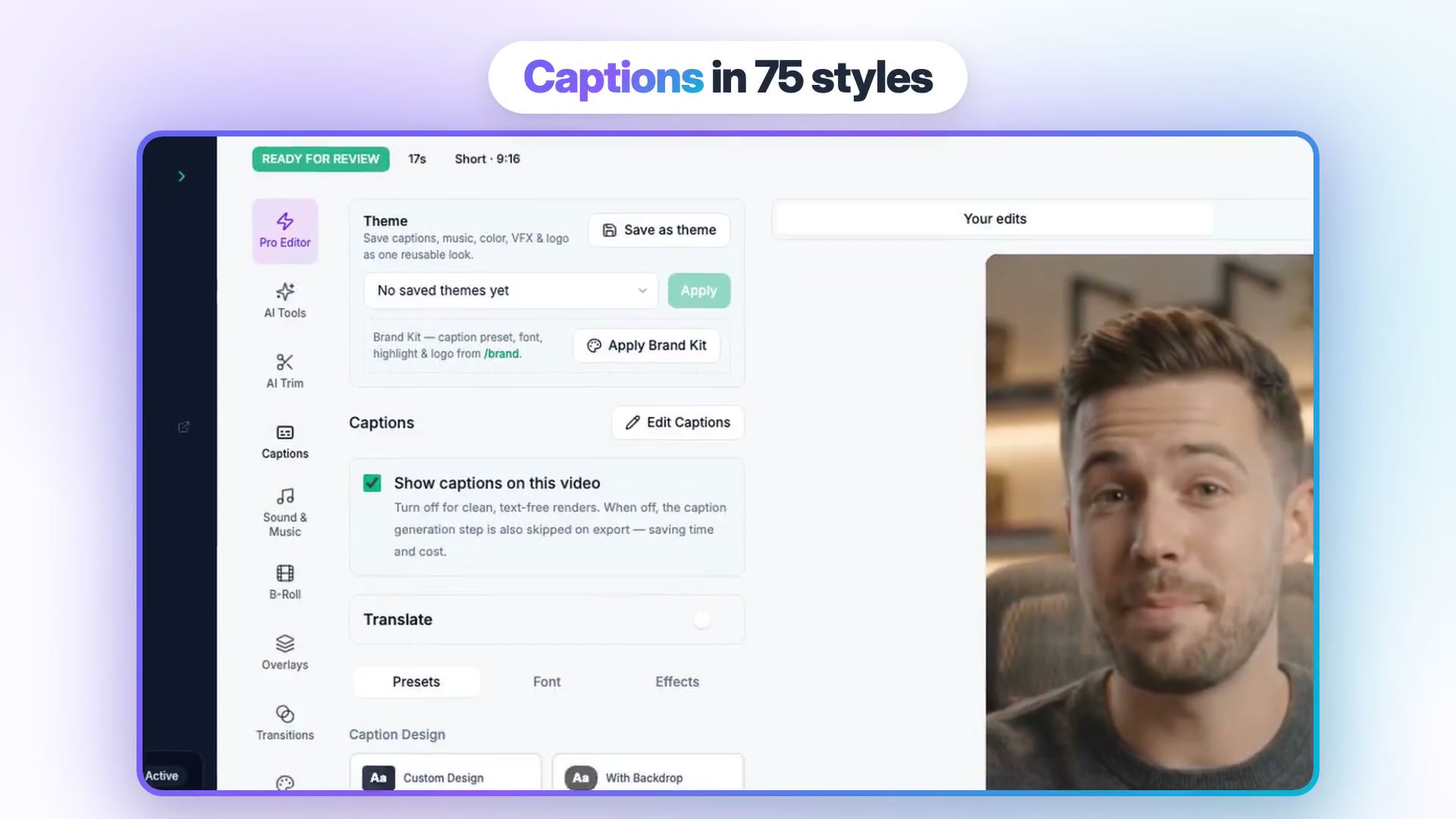
Burn captions into the video, keep them large, show two to four words at a time, and place them mid-frame, because TikTok's caption text and buttons sit along the bottom and right edge. Use one caption style everywhere so viewers recognize you; Vidpal's Brand Kit applies it to every render. Studio's auto captions are generated in English, but the editor's Translate panel can translate captions and dub the voice into 8 languages.
Posting rhythm: steady beats bursts
Pick a pace you can hold for 30 days, say one video a day, and schedule a week ahead. A practical two-week test:
- Days 1-3. Make nine videos on three niche topics, three formats each: a 30-second tip, a 60-second story and a 75-second explainer.
- Days 4-10. Post one a day at a fixed time, scheduled from Vidpal's Publish panel.
- Daily. Reply to comments within the first hour and pin the best question; reply videos are cheap content.
- Days 11-14. Compare average watch time and shares by format, drop the weakest, and double the strongest.
A virtual assistant earns their keep here: running the calendar, answering comments and DMs in your voice, and spending 20 minutes each morning collecting trending topics and formats in your niche. WoodBows can match you with a dedicated virtual assistant for this, and our content writers can draft scripts for Studio's Full Script input.
Which AI TikTok tool should you pick?
- If you want faceless TikToks without filming, start with Vidpal Studio, and add AI Clips if you record long videos.
- If you film yourself, use CapCut to edit for free, or Captions for one-tap polish on phone footage.
- If you have piles of recorded clips to caption and clean up, Submagic is built for that.
- If you want generated footage or AI avatars, try Revid.ai or InVideo AI and budget credits carefully.
- If your channel is one Reddit-story or text-chat format, Crayo is focused and cheap per video.
- If your brand lives in Canva templates, make occasional TikToks there.
- If you want TikToks scheduled without opening the app, Vidpal (Pro, Business), Revid.ai and Submagic (Pro, Business) schedule directly.
On YouTube too? See our guides to AI YouTube Shorts generators and AI tools for faceless YouTube channels.
What to do next
Write down three topics your audience asks about, then make one 60-second and one 75-second video for each. Create a free Vidpal account to test Studio and AI Clips, and move to Pro when you want TikTok publishing. If you'd like someone else to run the posting and the inbox, book a free consultation with WoodBows.
Frequently asked questions
Can AI make TikTok videos for free?
Partly. CapCut's free plan includes templates and basic editing, Canva's free plan downloads 1080p MP4s with no watermark unless you add paid elements, and Captions gives a one-time batch of credits. Vidpal's free plan has 4 one-time credits, but Studio, AI Clips and AI Editing exports need a paid plan from $19/month. For regular posting, expect to pay something.
Do I have to label AI-generated TikTok videos?
Yes, when the content shows realistic scenes or people. TikTok's Community Guidelines, effective 24 September 2026, require creators to label AI-generated or significantly edited content of that kind. TikTok may remove, restrict or label unlabeled videos, and a label does not excuse misleading content. Clearly stylized visuals, such as cartoons, fall outside that rule, but labeling when unsure is safer.
Can AI-generated TikToks earn money from Creator Rewards?
They can qualify if they meet the program's rules. You need a personal account, to be 18 or older, 10,000 followers and 100,000 views in the last 30 days. Videos must be longer than 1 minute and reach 1,000 qualified views. Rewards weigh originality and play duration, so repetitive, lightly edited AI videos start at a disadvantage.
Can Vidpal post to TikTok automatically?
Yes, on the Pro ($39/month) and Business ($69/month) plans. You connect TikTok once, then publish a finished video immediately or schedule it up to 90 days ahead from its Publish panel, and publishing uses no credits. Auto Reels can also auto-publish its videos. On Starter, Vidpal copies your caption and opens TikTok so you can post manually.
Is CapCut better than Vidpal for TikTok?
It depends on who does the editing. CapCut is a free manual editor with templates, auto captions and direct sharing to TikTok, so it suits creators who film and enjoy editing. Vidpal writes, voices, captions and schedules the video for you, at about $0.98 per video on Pro. For volume without editing, Vidpal fits better; for occasional hand-made trend videos, CapCut does.
How long should an AI-made TikTok be?
Match the length to the goal. Short 20- to 45-second videos suit quick tips and hook tests, while videos over 1 minute are required for Creator Rewards and suit stories and explainers. TikTok lets all creators post up to 3 minutes. Vidpal Studio renders 30, 45, 60, 75 or 90 seconds, so you can test both ranges from the same topic.