Chatbase vs PepoChat: Setup, Answer Quality, Human Handoff and Cost

Short answer: For a small business whose support runs through its website, PepoChat is the better choice. It has a free plan (100 AI replies a month), a $39 Starter plan with 1,000 replies, and a human team inbox on every plan. Chatbase starts at $40 for 700 message credits and keeps its Helpdesk inbox for the $150 Basic plan. Pick Chatbase for WhatsApp, Instagram, Slack or email channels, model choice, or published SOC 2 Type II.
- Setup: both crawl your site and install with one script tag; Chatbase also asks you to pick a model and write the "answer only from your data" rule.
- Answers: PepoChat searches your content on every reply with one model; Chatbase offers a model menu at 1 to 5 credits per request.
- Handoff: PepoChat's inbox and business-hours handoff are on the Free plan; Chatbase's Helpdesk starts at $150 a month.
- Cost at 2,000 AI replies a month: PepoChat $78, Chatbase $120 on a 1-credit model or $150 on a 2-credit model.
This comparison is for small-business owners and support leads deciding between Chatbase and PepoChat. Both turn your website and documents into an AI support agent in a chat widget. They differ in what you configure, what happens when your content has no answer, where a handed-off chat lands, and how the bill is counted.
We read each vendor's pricing page, help center and integration docs on 6 November 2026 and compared them on setup, answer grounding, human handoff and cost. Chatbase details come from the Chatbase pricing page and docs, PepoChat details from PepoChat's own pricing page and docs. Prices are in US dollars. PepoChat changed its plans on 5 November 2026, so older comparisons quote different allowances.
For the wider field, see our roundup of the best Chatbase alternatives for small businesses. PepoChat's own view is in its Chatbase vs PepoChat breakdown.
Chatbase vs PepoChat at a glance
| Chatbase | PepoChat | |
|---|---|---|
| Best for | Teams that support customers on messaging apps, want model choice, or need compliance paperwork | Small businesses whose support runs through the website |
| Free plan | None on the pricing page; a 7-day trial on each paid plan | Free: $0, 100 AI replies a month, 5 knowledge sources, no credit card |
| Entry paid plan | Hobby: $40 a month ($32 billed yearly), 700 message credits, 2 members | Starter: $39 a month ($390 a year), 1,000 AI replies, 3 members |
| Higher plans | Basic $150 (4,000 credits), Business $500 (15,000 credits), Enterprise custom | Growth $149 (5,000 replies), Scale $499 (17,000 replies) |
| Billing unit | Message credits: 1 to 5 per model request, set by the model you pick | AI replies: one per answer; team replies and test chats are free |
| Extra usage | Auto-recharge at $40 per 1,000 credits (these credits do not expire) | $39 per 1,000 replies on paid plans |
| When usage runs out | Widget shows "currently unavailable" unless auto-recharge is on | Free: new chats go to the team inbox; paid: replies continue as overage |
| AI models | Menu across OpenAI, Anthropic, Google, DeepSeek, Mistral, xAI and others, plus Auto | One OpenAI model for every workspace, no menu |
| Knowledge sources | Crawl, sitemap, links, PDF, DOC, DOCX, TXT, text, Q&A, Notion, closed Zendesk or Salesforce tickets (Business) | Crawl (200 pages, 3 levels), sitemap, links, PDF, DOCX, Markdown, HTML, TXT, CSV, JSON, images, text, Q&A, Notion, Google Drive, Help Center |
| Scanned PDFs | Not trainable without a text layer | Read |
| Knowledge size | 40 MB of text per agent on every plan, up to 80 MB with add-ons | 20 MB Free, 200 MB Starter, 1 GB Growth, 5 GB Scale |
| Automatic re-sync | Weekly on Basic and up; manual on Hobby | URL sources weekly on every plan; Notion and Drive daily; refresh on demand |
| When the answer is not in your content | Whatever your instructions say; you add the "training data only" rule | Says so and offers a person; a yes escalates |
| Built-in human inbox | Chatbase Helpdesk, Basic ($150) and up | Team inbox on every plan, Free included |
| Handoff alert to the team | Helpdesk notifications; optional Slack ticket threads | Email to every member with reason, last messages and link; webhook; Slack action |
| Out-of-hours behaviour | Shift schedules route tickets; no visitor-facing hours setting found | Business-hours mode with away message and email capture, or email-only follow-up |
| Team replies emailed to the visitor | Yes in the Chat Bubble (chat and email) | No; use Reply by email or Send Email |
| Seats included | 2 / 3 / 5; extra member $25 a month | 1 / 3 / 10 / 20; extra seat $15 a month |
| Channels | 16, including WhatsApp, Messenger, Instagram and Slack (from Hobby), email, phone, iOS and Android SDKs | Website widget, hosted chat page, widget voice, inbound phone; WhatsApp and Messenger in limited rollout |
| Voice | Basic and up; 6 credits a minute plus model credits | Widget voice on every plan, phone on Starter and up; 6 replies per started minute |
| Commerce actions | Shopify carts, orders and returns (Hobby); Stripe plan changes (Basic); no WooCommerce integration in the docs | Shopify order status, WooCommerce order lookup, Stripe subscription status and cancel at period end |
| Booking | Calendly and Cal.com Actions | PepoSmart calendars (no direct Calendly) |
| API | Basic and up | REST API and signed webhooks on every plan |
| WordPress | Official plugin, version 1.0.4, last updated March 2025 | Official plugin, PepoCloud AI Support Agent |
| Vendor badge | Removable for $99 a month | "Powered by PepoChat" on every plan, not removable |
| Languages | 95+ with automatic detection | Replies in the visitor's language; widget interface in 7 languages |
| Published compliance | GDPR, SOC 2 Type II, HIPAA (HIPAA-eligible on Enterprise) | Workspace isolation and AES-256-GCM encrypted credentials; no published SOC 2 |
Prices and features from each vendor's own pages, checked 6 November 2026.
Setup: what each tool asks before the first grounded answer
Both read your website, take files and give you a script tag. The difference is how many decisions sit between signing up and an answer you can trust.
Chatbase setup: sources, instructions, model, publish
Chatbase's first-agent guide estimates five minutes. You click New AI Agent, add training data (files, text, a website crawl, Q&A pairs or Notion pages) and click Create Agent; training usually takes 2 to 5 minutes. In Build > Instructions you write the instructions, choose a model and set the temperature, and a Compare view runs the same message against several versions. Saved changes stay in a draft until you click Publish. Then you copy the Chat Bubble script from Channels into your site, or use the WordPress plugin.
Chatbase's default instructions tell the agent to "do your best to assist them", and the best-practices page says that to keep it from answering outside your training data you should "say so explicitly". In Chatbase, grounding is something you configure.
PepoChat setup: sources, look, test, install
The quickstart in PepoChat's documentation has fewer settings. You sign up with email or Google and name your workspace, then paste your website address under Knowledge Base or upload documents. A whole-site crawl, up to 200 pages and 3 levels deep, counts as one of the Free plan's five sources. In Widget Customization you set the colour, greeting and suggested questions, then try the agent in the Test the agent drawer, where test chats are free. To go live you paste one script tag before the closing body tag, or install the PepoChat WordPress plugin and paste your Organization ID.
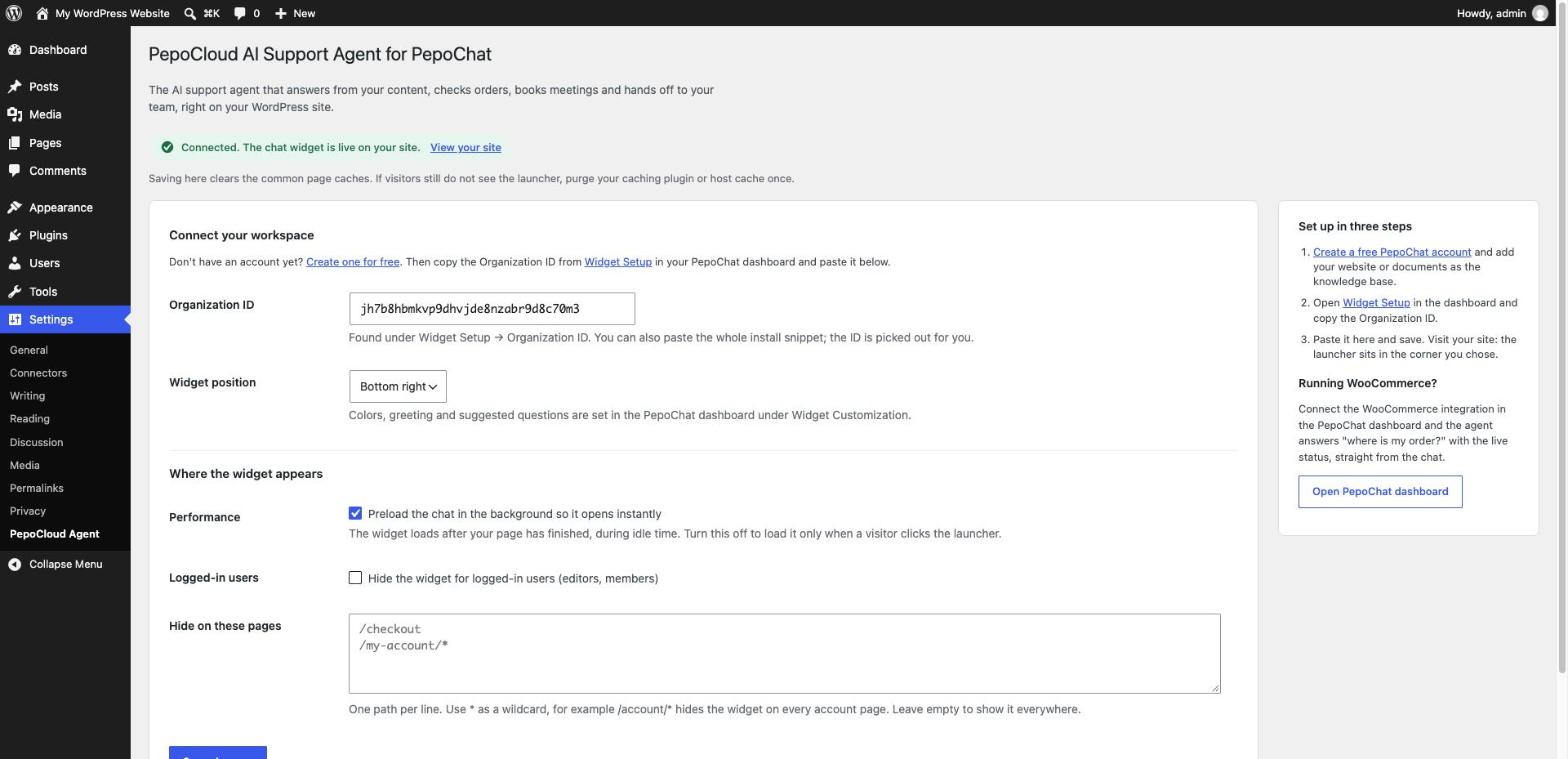
There is no model or temperature to set. Answering from your content, and offering a person when the content runs out, are defaults rather than instructions you write. Neither tool needs a developer for a standard website or WordPress install.
Answer quality: how Chatbase and PepoChat ground answers in your documents
Both use retrieval-augmented generation (RAG): the agent looks up passages in your own content and writes the reply from them, not from the model's general knowledge. Quality then depends on the model, on what happens when the search comes back empty, and on how fresh the content is.
Chatbase: a model menu priced in credits
Chatbase lets you pick the model on its Build page. Each model request costs message credits, Chatbase's billing unit: 1 for Auto, GPT-6 Luna or Claude 5.5 Haiku; 2 for GPT-6.1 Sol, Claude 5.5 Sonnet or Gemini 3.8 Flash; 4 for GPT-5.5; 5 for Claude 5.5 Opus. When an Action runs, one reply can take two requests. Model choice helps with questions that need multi-step reasoning, although Chatbase's own docs say instructions and data sources "account for most quality problems" and advise starting with the cheapest model that copes. Wrong answers are fixed with Q&A pairs or Revise.
PepoChat: retrieval on every reply, one model
PepoChat searches your private knowledge base for every reply and answers from what it finds. It does not browse the web. Every workspace uses the same OpenAI model, so you cannot pay for a stronger one on hard questions. Agent instructions change the tone and what the agent declines, not whether it stays with your content or hands off.
What each one does when it does not know
In Chatbase it depends on your instructions. The documented pattern is a rule such as "only provide answers based on the information from your training data" plus a polite fallback line. On Basic and up, the Escalations Action can turn a question the agent cannot answer into a ticket, after confirming with the customer. In PepoChat the behaviour is fixed on every plan: when the search finds nothing relevant, the agent says so and offers a person, and a yes escalates the conversation to the team inbox.
Keeping answers current: source re-sync
Chatbase applies edits within seconds, and Auto-resync re-reads websites, Notion and tickets weekly, but only on Basic and up; on Hobby you click Resync now, per the data sources docs. PepoChat re-fetches URL sources weekly on every plan, syncs Notion and Google Drive daily, and refreshes on demand with Sync website pages.
How to run the same question set on both
Take 30 to 50 real questions from your inbox, add ten your content does not answer and a few requests for a person, and load the same site and files into each tool: Chatbase's 7-day trial, where Compare lets you try a 1-credit and a 2-credit model, and PepoChat's free plan with the Test the agent drawer. Score each reply as correct, partly correct, not answered with a person offered, or invented. The invented count matters most, because one confident wrong refund policy does more harm than ten polite handoffs.
PepoChat also publishes a question-by-question test in its Vidpal customer story: on 6 November 2026 the agent on vidpal.ai got 7 of 10 factual questions right and 1 partly right, and declined 2 with a person offered, inventing none.
We ran that exercise on the PepoChat side. In our PepoChat review, a new agent trained only on PepoChat's public docs and pricing pages answered 34 of 42 factual questions fully correctly and 4 partly, offered a person on 2, gave a wrong detail on 2 and invented nothing, then passed all 8 behaviour checks. Every weak answer traced back to missing or outdated content. We did not run the same set on Chatbase, so treat this as one side of the comparison, not a head-to-head score.
Human handoff: where the conversation goes when the AI stops
Human handoff is the moment the AI stops replying and a person takes over the same conversation. What matters: whether your plan has an inbox, whether the person sees the whole conversation, and what happens at 9 pm.
Chatbase handoff: the Helpdesk, from the Basic plan
Chatbase has two routes. The Live Chat Action passes the conversation to the Chatbase Helpdesk in real time and tells the customer an agent will join shortly. The Escalations Action opens a ticket in the Helpdesk or in one of nine connected helpdesks, Zendesk and Freshdesk among them. With the Helpdesk, the AI stops until the ticket closes, and Chat Bubble replies reach the customer in the chat and by email. Tickets link to the full AI conversation and the customer's earlier tickets, and a takeover gets an AI-written summary. The catch is the plan: the pricing page lists the Helpdesk and every helpdesk integration from Basic ($150 a month) up, so neither route is on Hobby.
PepoChat handoff: a team inbox on every plan
PepoChat's team inbox is on every plan, Free included. The agent escalates when a visitor asks for a person or accepts its offer of help, when something fails, and when a Free workspace has used its 100 replies. Every member gets an email with the reason, the last three messages and a link. Teammates read the full transcript and reply in the chat as themselves, with assignment, tags, macros and internal notes. Two limits: inbox replies are not emailed to the visitor automatically (you use Reply by email or Send Email), and there is no native mobile app.
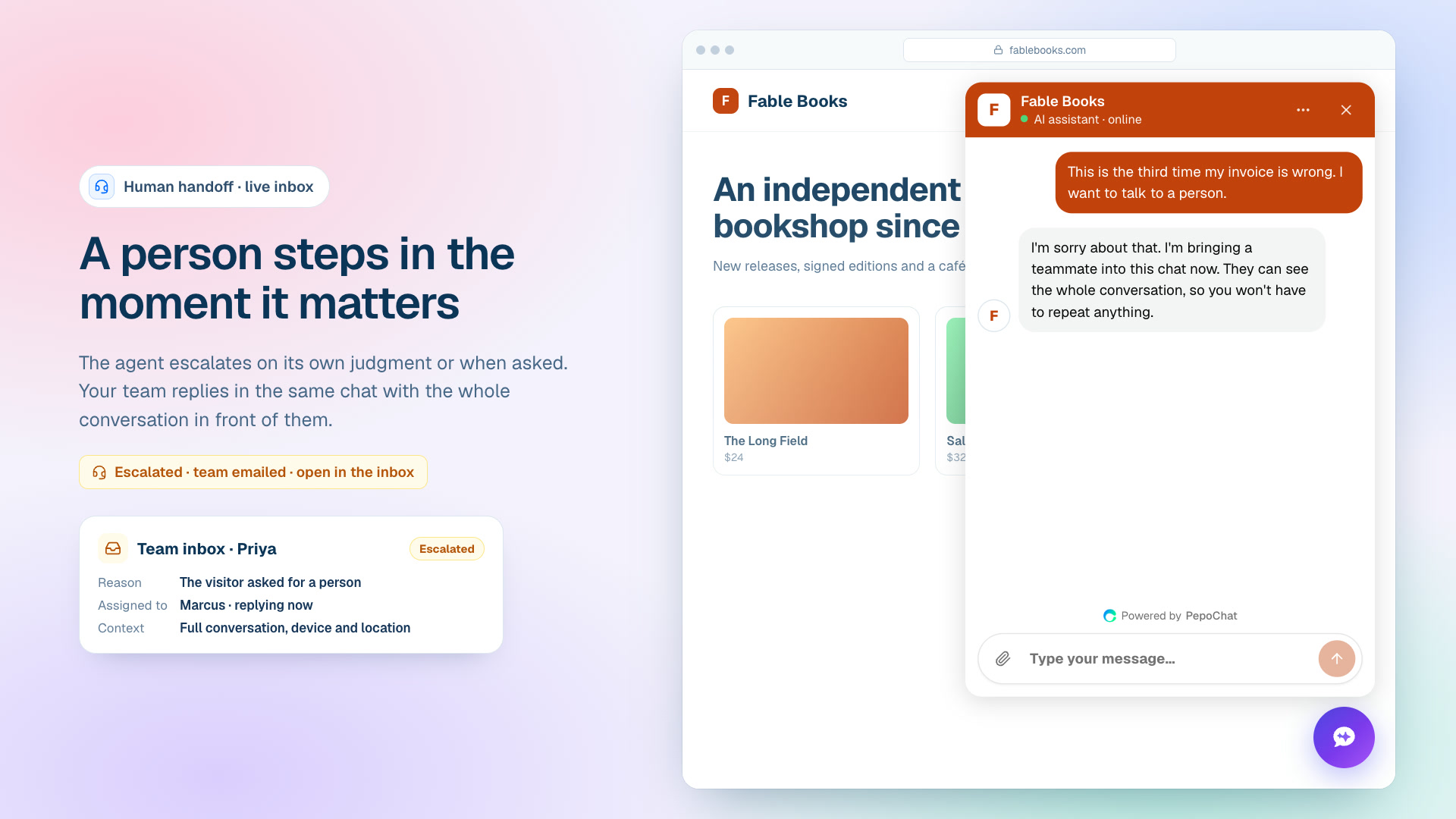
Out-of-hours: what visitors see when nobody is online
PepoChat's Team availability setting has three modes. Your team answers in the chat; or your team answers during business hours, with a weekly schedule and an away message, and outside them the agent asks for the visitor's email before handing over; or nobody answers live and you follow up by email, so the agent never promises a person. The AI keeps answering questions in every mode.
Chatbase's Helpdesk has shift schedules and an Away status, but they decide who receives tickets, not what the visitor is told, and we found no visitor-facing business-hours setting. Its live chat guide warns that an unstaffed live chat is worse than a ticket, so out of hours an Escalations ticket answered by email is the safer route.
A handoff only works if someone answers. A common split: the AI takes the repetitive questions around the clock, and a person works the escalations during the day. If that person is not on your payroll yet, a remote customer support assistant can work from either inbox, since both are web apps. See how to hire a virtual assistant through WoodBows.
Cost: Chatbase vs PepoChat monthly bills at 500, 2,000 and 10,000 AI replies
PepoChat bills AI replies, meaning one answer the agent generates, whatever the question. Chatbase bills credits per model request, so one reply costs 1 to 5 credits. Our explainer on what AI customer support really costs compares these units.
Assumptions: monthly billing; one model request per reply (no Action, no attachment); seats within each plan's allowance; no voice and no branding removal. Chatbase top-ups are counted in whole packs of 1,000 credits at $40, as the price is quoted, and unused top-up credits do not expire. PepoChat bills replies past a paid allowance at $39 per 1,000.
| AI replies a month | PepoChat | Chatbase, 1-credit model | Chatbase, 2-credit model | Chatbase with its Helpdesk inbox (1-credit / 2-credit) |
|---|---|---|---|---|
| 500 | $39: Starter (1,000 replies included) | $40: Hobby (700 credits) | $80: Hobby plus one top-up (1,000 credits needed) | $150 / $150: Basic (4,000 credits) |
| 2,000 | $78: Starter plus 1,000 extra replies ($39) | $120: Hobby plus two top-ups | $150: Basic (4,000 credits needed) | $150 / $150: Basic |
| 10,000 | $344: Growth plus 5,000 extra replies ($195) | $390: Basic plus six top-ups ($240) | $700: Business plus five top-ups ($200) | $390 / $700 |
Prices and features from each vendor's own pages, checked 6 November 2026.
On the cheapest plan that covers the volume, PepoChat costs $39 against $40 at 500 replies, $78 against $120 at 2,000, and $344 against $390 at 10,000, with Chatbase on a 1-credit model. A 2-credit model doubles Chatbase's bill at 500 replies. The bigger gap is the human inbox: on Chatbase it means the Basic plan at $150 a month, which is $111 more than PepoChat at 500 replies.

Yearly billing evens out the low end: Chatbase Hobby is $384 a year and PepoChat Starter $390. Model choice widens it: 2,000 replies on Claude 5.5 Opus need 10,000 credits, a $390 month. Chatbase lists $25 a month per extra member or agent and $99 a month to remove its badge; PepoChat charges $15 a month per extra seat, and its "Powered by PepoChat" line cannot be removed. For voice, Chatbase charges 6 credits a minute plus model credits, while PepoChat counts each started minute as 6 replies, about $0.23 a minute past a paid allowance. Current numbers are on PepoChat's pricing page.
Who should choose Chatbase
Chatbase is the stronger product when:
- Customers message you on WhatsApp, Instagram, Messenger, Slack or email. WhatsApp, Instagram, Messenger and Slack are all on the $40 Hobby plan. PepoChat's WhatsApp and Messenger channels are in limited rollout, and it has no Instagram or email channel.
- You want model choice for hard, multi-step questions, at 2 to 5 credits a request for the stronger models.
- You need compliance paperwork. The pricing page lists GDPR, SOC 2 Type II and HIPAA, with HIPAA-eligible accounts and SSO on Enterprise.
- You want Shopify or Stripe self-service, such as carts, exchanges, returns and plan changes. PepoChat's Shopify action reports order status only.
- You want a deeper helpdesk with shifts, routing, triggers and CSAT surveys, or replies emailed to customers automatically.
- You need the vendor badge removed, which Chatbase sells for $99 a month.
Who should choose PepoChat
PepoChat is the better fit when:
- Your support runs through your website. The widget, hosted chat page, widget voice calls and an inbound phone line on paid plans all feed one inbox.
- You want a person in the loop without a helpdesk tier. Handoff, the inbox and business-hours behaviour are on Free and Starter.
- You want a predictable bill. One reply is one reply, and paid plans keep answering past the allowance instead of going dark.
- Your knowledge sits in scanned PDFs, Google Drive or WordPress, all supported on every plan.
- You sell on WooCommerce. The agent looks up orders by number or full email address; Chatbase's docs list no WooCommerce integration.
- You want to start free, with no credit card.
PepoChat's own case, with a migration walkthrough, is on its Chatbase alternative page.
Which should you pick? Our verdict
For most small businesses whose customers reach them through the website, we recommend PepoChat: fewer settings to get wrong, a human inbox and out-of-hours handoff on every plan, and a lower bill at every volume we priced on monthly billing. Chatbase is the better product for a different buyer.
- If you want a human inbox for less than $150 a month, choose PepoChat.
- If many of your conversations start on WhatsApp, Instagram, Messenger, Slack or email, choose Chatbase.
- If buyers will ask for a SOC 2 Type II report or a HIPAA arrangement, choose Chatbase.
- If you want a stronger model on hard questions and accept a variable bill, choose Chatbase.
- If you expect fewer than 100 AI replies a month, start on PepoChat's free plan and upgrade when you outgrow it.
What to do next
Collect 30 real customer questions, then create a free PepoChat account and run them through the Test the agent drawer. If the answers hold up, add the script tag or the WordPress plugin and set Team availability to match your hours. If you would rather have a person covering the inbox from day one, book a free consultation with WoodBows.
Frequently asked questions
Is PepoChat cheaper than Chatbase?
Usually, on monthly billing. At 2,000 AI replies a month PepoChat costs $78 on Starter, while Chatbase costs $120 on a 1-credit model or $150 on a 2-credit model. PepoChat also has a free plan with 100 replies a month, where Chatbase offers a 7-day trial.
Which gives more accurate answers, Chatbase or PepoChat?
Both answer from your own content, so accuracy depends mostly on how complete and current that content is. Chatbase lets you pick stronger models, but you add the "answer only from training data" rule yourself. PepoChat uses one model, searches your content on every reply and offers a person when it finds nothing.
Can either tool hand a chat to a human on its cheapest plan?
PepoChat can: its team inbox, escalation emails and business-hours handoff are on every plan, including Free. Chatbase lists its Helpdesk inbox and its helpdesk integrations from the Basic plan at $150 a month, so the $40 Hobby plan has no built-in place for a person to take over.
Does PepoChat work on WhatsApp or Instagram like Chatbase?
Not generally yet. PepoChat's WhatsApp and Messenger channels were in limited rollout in November 2026, and it has no Instagram, SMS or email channel. It covers the website widget, a hosted chat page, widget voice calls and inbound phone calls on paid plans. Chatbase includes WhatsApp, Messenger, Instagram and Slack on its $40 Hobby plan.
Is Chatbase or PepoChat SOC 2 compliant?
Chatbase lists GDPR, SOC 2 Type II and HIPAA on its pricing page, with HIPAA-eligible accounts on Enterprise. PepoChat does not publish a SOC 2 report; it isolates each workspace's knowledge, conversations and credentials and encrypts integration credentials with AES-256-GCM. If your customers require a SOC 2 report, Chatbase is the safer choice.
Can I move my Chatbase knowledge base to PepoChat?
Mostly. Chatbase exports files as plain text, text snippets as Markdown and Q&A pairs as an Excel sheet. PepoChat accepts TXT, Markdown and CSV uploads, so save the Q&A sheet as CSV first. Website and Notion sources cannot be exported, so re-crawl the site and reconnect Notion in PepoChat.