Best AI Customer Support Chatbots With Human Handoff (2026)

Short answer: PepoChat is the best AI customer support chatbot with human handoff for small teams that do not run a helpdesk. Handoff and the team inbox are on every plan, including Free ($0, 100 AI replies a month), your team replies in the same chat window, and a business-hours setting asks visitors for an email when nobody is online. If you already work in Intercom, Zendesk, Gorgias or HubSpot, use that vendor's AI agent instead.
- A good handoff passes the transcript, the visitor's details, what the AI tried and why it stopped.
- PepoChat and Tidio include AI handoff and a team inbox on a free plan; Chatbase's inbox starts at $150 a month.
- Out of hours is where handoffs break: check for an away message and email capture.
- Intercom, Zendesk, Tidio and Gorgias do not charge an AI fee when a visitor simply asks for a person.
This guide is for small businesses that want an AI chatbot to answer routine questions and a person to take the rest: refunds, complaints and anything the AI cannot answer from your content.
We read each vendor's pricing page, help center and integration docs on 6 November 2026 and compared them on setup, answer grounding, human handoff and cost, with most weight on the handoff. Where a vendor's documentation does not describe a behaviour, we say so. Prices are US dollar list prices checked on 6 November 2026; PepoChat changed its plans on 5 November, so older PepoChat figures are out of date.
What is human handoff in an AI customer support chatbot?
Human handoff is the point where an AI chatbot stops answering and passes the conversation to a person, because the customer asked for one or because the AI could not help. Vendors also call it escalation, transfer or handover. The person who picks it up should receive four things:
- The full transcript, so the customer never repeats the problem.
- The customer's details: name and email if given, the page they were on, their device and browser.
- What the AI already tried, including any action that failed, such as an order lookup.
- A reason: asked for a person, nothing relevant found, a tool failed, or the customer was frustrated.
Without them, your team's first message becomes "How can I help?", which tells the customer nobody read their messages. PepoChat's guide to how chatbot escalation should work covers triggers and wording in more depth.
How we ranked the handoff in each chatbot
Every tool below can pass a chat to a person. The ranking rests on five questions:
- Where does the conversation land? In an inbox built into the chatbot, or in a separate helpdesk, ticketing software such as Zendesk that queues requests for a support team.
- Does the person reply in the same chat, or does the customer get a ticket and a slow email?
- How is the team alerted? Email, Slack, a routing rule, or a counter nobody watches.
- What happens outside business hours? An away message, an email request and a reply by email later.
- Which plan includes it, and does a handoff use up AI credits?
The ranking favours tools that do all five well for teams of one to ten people.
AI chatbots with human handoff compared
| Tool | Handoff lands in | Routing and alerts | Outside business hours | Free plan with AI handoff | Lowest paid price with AI and handoff |
|---|---|---|---|---|---|
| PepoChat | Built-in team inbox | Email to every member with the reason, last 3 messages and a link; Slack action; webhook | Away message and email request before handover, or "we follow up by email" mode | Yes, 100 AI replies a month, 1 member | Starter $39/month, 1,000 replies, 3 members |
| Tidio (Lyro) | Built-in inbox and tickets | Transfer to an agent; offline tickets go to Unassigned | Says nobody is available; ticket option collects an email | 50 Lyro conversations, once | Lyro add-on from $39/month for 50; operating hours from Starter $29/month |
| Crisp (Hugo) | Built-in shared inbox | Routing rules to named inboxes; reply from Slack from Mini | Office hours: Hugo says when to expect an answer | No (Free has no AI) | Mini $45/month per workspace, 4 seats |
| Intercom (Fin) | Intercom team inbox | Chosen team or teammate; rules and round robin from Advanced | Not described in the chat setup article | No, 14-day trial | Essential $29/seat/month yearly plus $0.99 per outcome |
| Zendesk AI agents | Zendesk tickets and messaging | Transfer group; checks agent availability | You build the closed-hours branch | No, 14-day trial | Suite Team $55/agent/month yearly; 5 resolutions per agent, then $1.50 to $2.00 |
| Gorgias AI Agent | Gorgias helpdesk | Handover view; auto-assign on the ai_handover tag | Always asks for an email; closes the ticket without one | No, 7-day trial | Starter $10 plus $30 AI Agent a month; Shopify store required |
| LiveChat (Text AI Agent) | Text chat and ticket inbox | First available teammate or a chosen team | Ticket if no teammate answers within 30 seconds | No, 14-day trial | Essential $19/user/month yearly, 10 AI resolutions |
| Chatbase | Chatbase Helpdesk or 9 outside helpdesks | Helpdesk auto-assignment; tickets in Zendesk, Freshdesk and others | Escalation ticket; Helpdesk away mode and shifts | No, 7-day trial | Basic $150/month ($120 yearly) |
| HubSpot customer agent | HubSpot inbox or help desk | Escalation rules and low-confidence transfers | Not described on the pages read | No (free tools have no AI agent) | Smart CRM Professional $45/seat/month yearly plus $0.50 per resolution |
Prices and features from each vendor's own pages, checked 6 November 2026.
The best AI customer support chatbots with human handoff in 2026
1. PepoChat: best handoff for small teams without a helpdesk
PepoChat is an AI support agent for websites with a team inbox built in, and its handoff works the same on every plan, including Free. It hands over when the visitor asks for a person, when it finds nothing relevant in your knowledge base and the visitor accepts its offer of help, or when a tool or reply fails. When Free's 100 monthly AI replies run out, new conversations go to the inbox with a friendly message instead of failing.
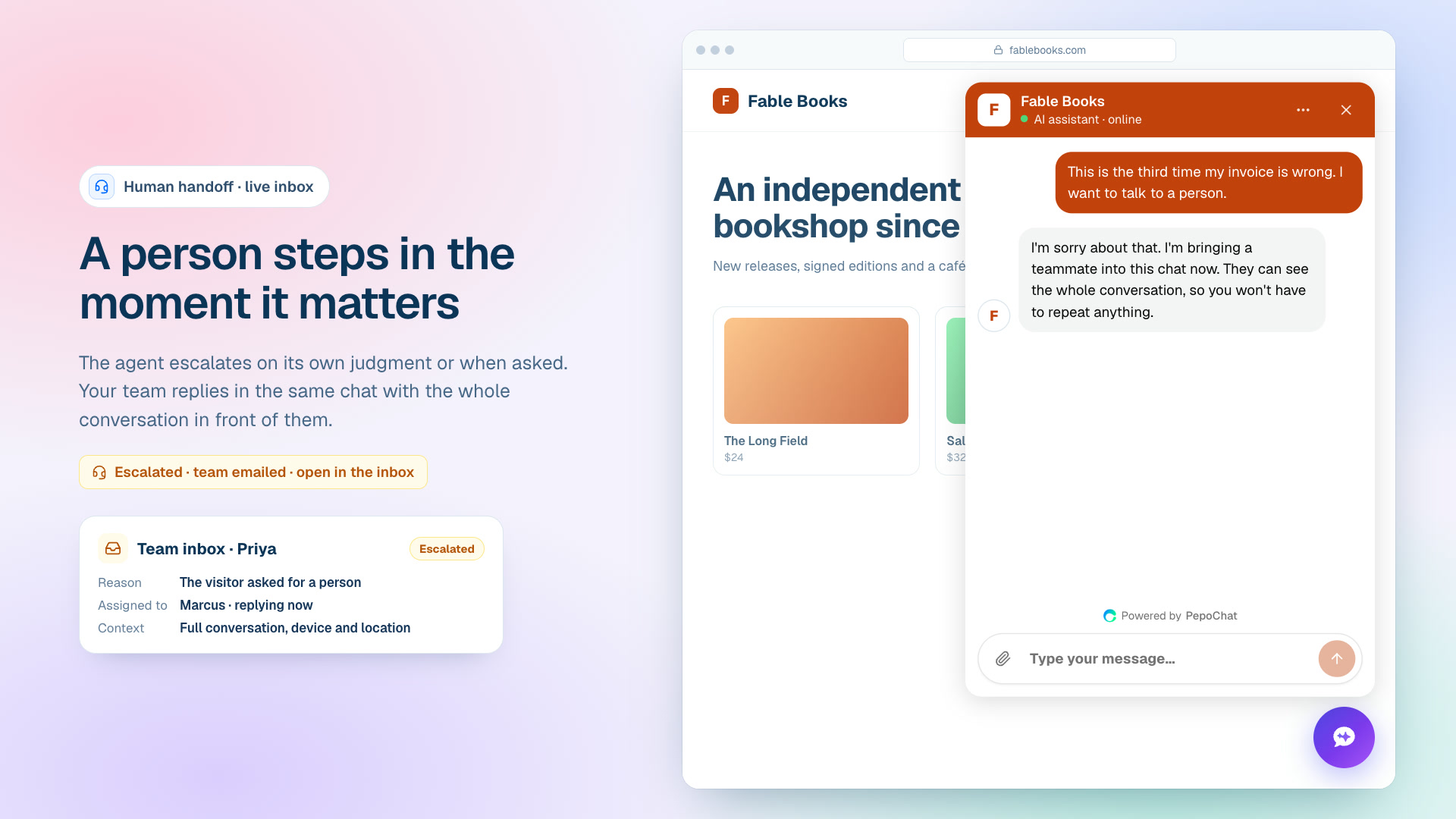
The conversation is marked escalated, the AI stops replying, and your teammate answers as themselves in the window the visitor already has open. The inbox shows the transcript, name and email once known, plus browser, device and timezone. Every member gets an alert email with the reason, the last three messages and a link; a Slack action and a conversation.escalated webhook cover other tools. The Team availability setting has three modes: "My team answers in the chat"; "My team answers during business hours", with a schedule, an away message and an email request outside hours; and "No one answers live chat, we follow up by email". The AI keeps answering in all three.
Vidpal, an AI video tool, has run PepoChat on the Free plan since August 2026, with 94 visitor conversations and 8 handoffs to its team between 8 August and 6 November 2026, according to the Vidpal customer story. In its published test on 6 November 2026, 7 of 10 factual answers were right, none were invented, and for the 2 it could not answer the agent offered a person.
We tested this on 6 November 2026 in a new PepoChat workspace. Asked "I want to talk to a real person", the agent escalated at once. With the team set to closed hours, and again in email-only mode, the visitor asking for a person about an invoice got our away message and one request for an email; once given, the agent confirmed the address and escalated. One rough edge: the email-only confirmation repeated "Leave your email". Transcripts are in our PepoChat review.
Free is $0 with 100 AI replies and 1 member; Starter is $39 a month for 1,000 replies and 3 members; Growth is $149 for 5,000 replies and 10 members (see PepoChat's pricing page). Replies your team types are not AI replies. Limits: inbox replies are not emailed to the visitor automatically (use the alert's Reply by email button or the inbox's Send Email); there is no native mobile app, though the dashboard works in a phone browser; and WhatsApp and Messenger are in limited rollout, with no Instagram or email channel.
2. Tidio (Lyro): best for small online stores that want different rules online and offline
Tidio's live chat inbox and ticketing come with every plan, including Free with 10 seats. Lyro's default, online and offline, is to transfer the chat to an agent; you can instead create a ticket. Offline, Lyro first says nobody is available; with the ticket option it asks for an email, promises a reply by email and files the ticket with the transcript. An immediate handoff deducts nothing from the Lyro quota.
Free includes 50 Lyro conversations once, not monthly, and at Free's limit of 50 billable conversations a month your team cannot reply to new messages until the reset. Operating hours start on Starter ($29 a month), per Tidio's pricing page; Lyro is an add-on from $39 a month for 50 conversations. Tidio beats PepoChat on channels: email, Messenger, Instagram and WhatsApp on every plan.
3. Crisp (Hugo): best flat-priced shared inbox where a reply takes over from the AI
Crisp prices its shared inbox per workspace, not per seat. Its AI agent Hugo offers a person when it cannot find an answer, escalates when the user is frustrated or asks for a human, follows routing rules to named inboxes, and steps aside when an operator replies: "he will interrupt himself", says Crisp's escalation guide. With office hours on, Hugo tells customers when to expect an answer.
Hugo starts on Mini at $45 a month for 4 seats and $5 of credits, which Crisp estimates at around 90 automated conversations; when credits run out, chats go to your operators. Free has no AI, WhatsApp and Instagram need Essentials ($95), and order lookups sit on Plus ($295).
4. Intercom (Fin): best for growing teams that want AI and agents in one mature helpdesk
Fin hands over to a team or teammate you choose. It can first ask the customer for more details, or you can close the conversation and offer a phone number or link instead, per Intercom's Fin chat setup article, which does not describe out-of-hours behaviour. Rule-based routing and round robin need Advanced ($85 per seat a month, yearly).
Essential lists at $29 per seat a month yearly (shown as $19 for new customers) or $39 monthly, plus $0.99 per Fin outcome. Intercom's pricing page says that if the customer asks to speak to a human, you pay nothing, though a handoff ending a Procedure (a multi-step workflow) is billed. No free plan; a 14-day trial.
5. Zendesk AI agents: best for ticket-based teams that route by business hours
Messaging and live chat start on Suite Team at $55 per agent a month yearly ($69 monthly). Each AI agent has a transfer group for escalated tickets, and flows can check business hours, holidays and whether any agent is online before escalating, as Zendesk's business hours article explains. You build the closed-hours message yourself.
The AI is billed per automated resolution, a conversation the AI resolves without a person: 5 a month per agent are included, then $1.50 to $2.00 each. Assisted escalations are not billed. No free plan, and CSAT surveys need Suite Professional.
6. Gorgias AI Agent: best for Shopify stores
Gorgias's AI Agent needs a connected Shopify store. Anger, an explicit request for a human and sensitive topics always trigger a handover. Online, you choose whether it asks for an email first; offline it always asks, and closes the ticket if the shopper leaves none, per Gorgias's handover guide. Handovers land in their own view and can be auto-assigned by tag.
Starter is $10 a month plus $30 for the AI Agent. AI interactions cost $1.00 monthly or $0.90 annually ($1.50 past the bundle) and each also counts as a ticket; a handoff is billed as a ticket only. No free plan; a 7-day trial.
7. LiveChat (Text AI Agent): best for staffed chat teams that want a ticket fallback
New LiveChat customers now buy Text plans. The AI Agent's "Transfer to human" skill sends the chat to the first available teammate; if nobody is available within 30 seconds, it can create a ticket, per Text's AI Agent help page. Essential is $19 per user a month yearly ($25 monthly) with 10 AI resolutions for the workspace; working hours start on Growth ($79 per user).
8. Chatbase: best for handing off into a helpdesk you already run
Chatbase Live Chat routes the chat to its Helpdesk inbox in real time, including on WhatsApp, Instagram and Messenger, while the Escalations action files a ticket in the Helpdesk or one of nine outside helpdesks such as Zendesk and Freshdesk. Chatbase's live chat docs are frank: "An unstaffed live chat is worse than a ticket." The Helpdesk and integrations start on Basic at $150 a month; the $40 Hobby plan has neither. Our Chatbase vs PepoChat comparison goes deeper.
9. HubSpot customer agent: best for teams already working in HubSpot
HubSpot's agent transfers a chat when its confidence is low or escalation rules are met, and chats close after 24 hours without a visitor reply, per HubSpot's customer agent guide, which does not cover business hours. It needs a Professional edition: Smart CRM Professional is $45 per seat a month yearly, plus $0.50 per resolution. Only visitor-started handoffs stop a chat counting as resolved.
What happens to a chatbot handoff outside business hours?
Most failed handoffs happen at night or at the weekend: the bot promises a teammate, nobody comes, and the customer leaves without a way to reach them. An away message is the short note a chatbot shows when nobody can answer live. A good out-of-hours handoff shows it, says the team is offline and collects an email address, as PepoChat, Tidio and Gorgias document. Then check that your morning reply reaches the customer's inbox; in PepoChat you send it with the alert's Reply by email button.

How to test a chatbot's handoff before you buy
Run these checks on your own site during a free plan or trial:
- Ask for a person. Type "I want to talk to a human", then "this isn't helping". The first should hand off at once; the second should at least offer a person.
- Ask something not in your docs. A good agent says it does not know and offers a person; a weak one invents an answer.
- Test outside business hours. Set your hours to end in five minutes; the widget should say the team is offline and ask for an email.
- Check what the alert contains: the reason, recent messages, visitor details and a direct link.
- Reply from the inbox and confirm it appears in the same chat under a person's name.
- Check the visitor gets a reply by email when nobody is online. Leave an email as the visitor, close the tab, answer later and see whether it arrives.
- Look at the bill. Did the handoff use an AI reply, credit or resolution? Our guide to replies, credits and resolutions explains each unit.
Who should take the handoff: your own staff or a support assistant?
An AI agent can answer repetitive questions at any hour. It cannot approve a refund exception, calm a customer who has been passed around, or notice that three people reported the same broken checkout. That needs a person who knows your policies.
If nobody on your team has the time, the handoff can go to a remote customer support assistant from WoodBows who can work in your chatbot's inbox as a team member, takes escalations during agreed hours and emails visitors who left an address overnight. In PepoChat that means a seat (extra seats are $15 a month), the alert emails and a list of cases the assistant may resolve. See how hiring a virtual assistant works.

Which AI chatbot with human handoff should you pick?
- No helpdesk, small team or just you: PepoChat, with handoff and out-of-hours email capture on Free and 3 seats on Starter at $39.
- Customers mostly on WhatsApp, Instagram or Messenger: Tidio or Crisp.
- A Shopify store with real ticket volume: Gorgias.
- Already on Zendesk, Intercom or HubSpot: that vendor's AI agent, so handoffs land in the queue your team watches.
- AI that files tickets into Zendesk or Freshdesk: Chatbase on Basic.
- Chat staffed most of the day: LiveChat's Text plans.
For a wider field, see the best AI customer support chatbots for small businesses or PepoChat's own comparison of chatbots with human handoff.
What to do next
Create a free PepoChat account, add your website as a knowledge source, set Team availability to match how your team works, and run the seven checks above before going live. If you need someone to answer the chats the AI hands over, book a free consultation with WoodBows.
Frequently asked questions
What is human handoff in an AI chatbot?
Human handoff is when an AI chatbot stops answering and passes the conversation to a person, because the customer asked for one or the AI could not help. A good handoff passes the full transcript, the customer's contact details, what the AI tried and why it stopped, so nobody has to repeat anything.
Which AI chatbot has the best human handoff for a small business?
For a small team without a helpdesk, PepoChat. Handoff, the team inbox and the business-hours setting are on every plan, including Free at $0 with 100 AI replies a month. Your team replies in the same chat, and outside hours the agent asks for the visitor's email.
Can an AI chatbot hand off to a human when nobody is online?
Yes, if it is set up for it. The chatbot should say the team is offline, show an away message and ask for an email address so someone can reply later. PepoChat, Tidio and Gorgias document this email capture, and Text creates a ticket when no teammate answers within 30 seconds.
Do I need a separate helpdesk to use chatbot handoff?
No. PepoChat, Tidio, Crisp and Text include a live chat inbox, so the handoff lands in the same product, and Intercom, Zendesk, Gorgias and HubSpot are helpdesks themselves. Chatbase hands off to its own Helpdesk from the $150 Basic plan or files tickets in outside helpdesks.
Does a handoff to a human use up AI credits?
Usually not. Intercom charges nothing for Fin when a customer asks for a human, Zendesk does not bill assisted escalations, Tidio deducts nothing when Lyro hands off immediately, and Gorgias bills a handed-off chat as a ticket only. In PepoChat, replies your team types are not AI replies.
Who should answer the conversations an AI chatbot hands off?
Someone who knows your policies and checks the inbox at set times: the owner, an employee, or a remote customer support assistant working as a seat in the chatbot's inbox. Send them the escalation alerts, list which cases they may resolve alone, and make sure visitors who left an email get a reply.